Packing fee, delivery and couriers
Set the packing fee added to every order, the amount from which packing is free, and the couriers customers can choose — in “Settings” → “Shipping”.
In Laos most customers pay the delivery itself to the courier, when they collect the parcel at the branch. What the shop adds to an order is the “packing fee”: money for packing the goods and taking them to the courier. Customers see it in the cart before they confirm, and in the “Delivery & payment” box on every product page.
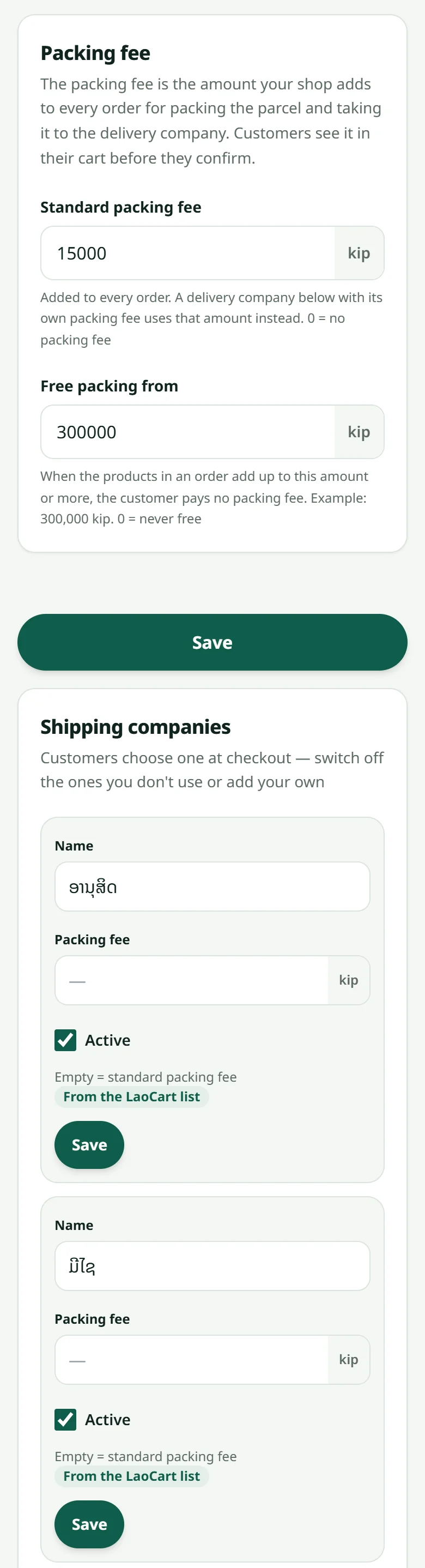
- 1Open “Settings” → “Shipping”
- 2“Standard packing fee”: the amount added to every order — 0 = none (the product page then says nothing about a fee)
- 3“Free packing from”: the order amount from which customers pay no packing fee — 0 = never
- 4“Shipping companies”: switch off the ones you do not use from LaoCart's list (Anousith, Mixay, HAL Express) or press “Add” for a courier of your own, with its own fee when it differs (empty = the standard fee)
- 5Press Save: customers pick the courier at step 2 of the checkout, and the logos of the couriers you switched on appear at the bottom of your shop
The destination branch: customers can type it in the “Village / courier branch” field when they order. Write it on the parcel label and drop the parcel off; when you print the label you choose who pays the courier — the shop, or the customer on arrival.
Expensive goods, or customers who might not collect the parcel: switch on “Cash on delivery with a deposit” in “Settings” → “Payment”. From the amount you choose, the customer transfers a part (30 %, say) by QR before you send the parcel, and the courier collects the rest — see Cash on delivery.
See it from the customer's side in What the buyer sees. A sale you record yourself (at the counter or on WhatsApp) uses the same packing fee, and you can change it each time — see Recording a sale.
Related articles
Cash on delivery
Take orders without a transfer first — but set your own rules clearly.
Print parcel labels
Print a label for each parcel, on a label printer, on A4 paper or as a picture from your phone.
What the buyer sees
Knowing their side of the screen makes answering a customer much faster.
Recording a sale made outside the website
Sold at the counter or on WhatsApp? Record it in the dashboard so the stock stays right and the customer has a history.
Still stuck?
Message us on WhatsApp. Sending your shop name and a screenshot gets you an answer much faster.
Message LaoCartWant us to do it for you — enter your products, design your covers? That is an optional service, billed separately. See the optional services