Tracking numbers
Keep the courier's number on the order, and send it to the customer with the bill on WhatsApp.
- 1Open the order and set the status to “Shipped”
- 2Type the number the courier gave you and save
- 3Press the WhatsApp button on the order and send the customer the number and a photo of the shipping bill
Every customer gets an order code when they order. With that code alone they open the tracking page and see the order's status, the items and the amounts — no account needed. The tracking number is not shown there: it reaches the customer on WhatsApp.
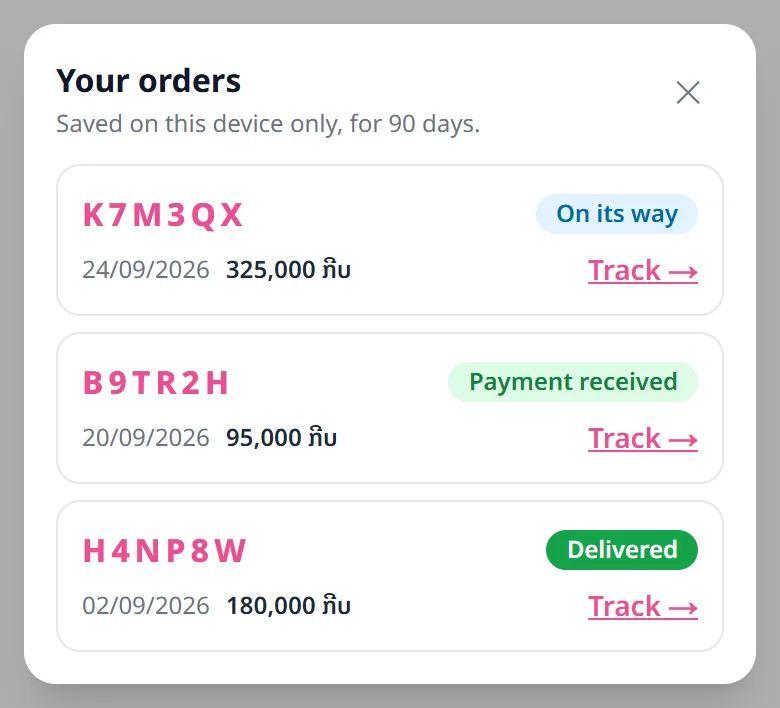
Customers no longer need to write the code down: every order placed or tracked on their phone appears under the button next to the cart (a list icon with a number), for 90 days (the last 10 orders).

Related articles
Still stuck?
Message us on WhatsApp. Sending your shop name and a screenshot gets you an answer much faster.
Message LaoCartWant us to do it for you — enter your products, design your covers? That is an optional service, billed separately. See the optional services