Stock: goods received, cost prices and profit
The “Stock” menu shows what is on the shelf and what to order again, records the goods that arrive with the supplier's invoice, and works out your profit from the sales.
The stock of every product (and every option) goes down by itself when an order is confirmed and comes back when it is cancelled. The “Stock” menu puts it all on one page: how many are left of each product, how many sold in 30 days, about how many days are left, and what to order again.
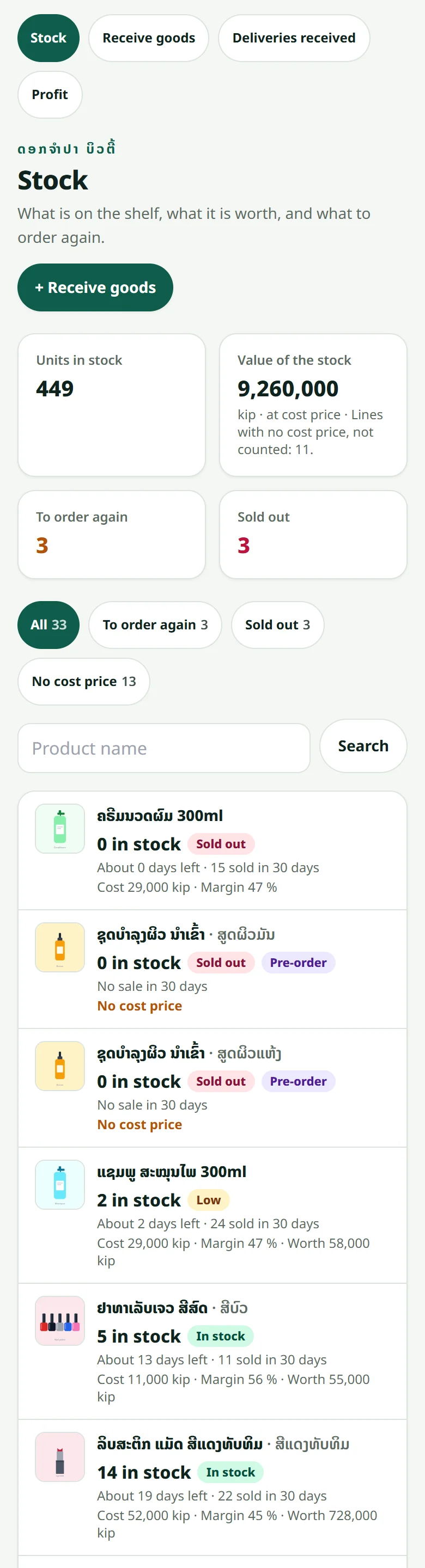
- 1Open “Stock”: lines that are “Sold out” and “Low” come first — set how many units count as low under “Low-stock alert”
- 2Tap “To order again” to see only the products that are out, low, or will run out within two weeks at the pace they sell — then “Copy the list to order” and send it to your supplier
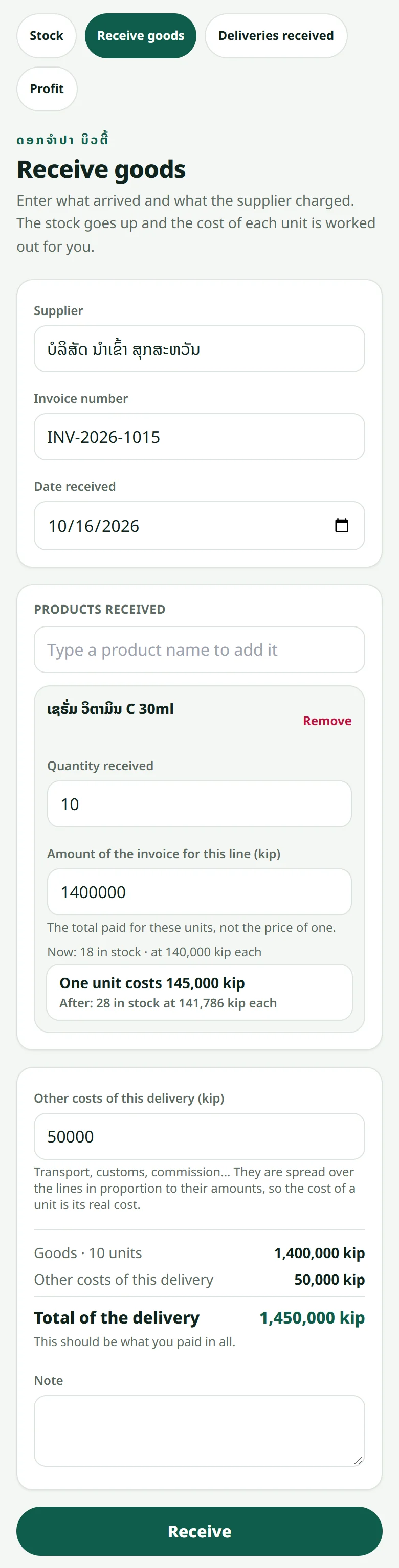
- 3Goods arrive: tap “Receive goods”, pick the product (or the option), type the quantity received and the amount of the supplier's invoice for that line (the total, not the price of one) — transport or other costs of that delivery go under “Other costs”
- 4Tap “Receive”: the stock goes up and the cost of one unit of each product is worked out for you (the average of what was there and what arrived)
- 5Counted the shelf and the number is off? Open the product in “Stock”, then “Correct the stock”: a count, units taken off with a reason (damaged, expired, given away, used by the shop…), or units found
Every change is written in the product's “History”: sale, cancellation, delivery, count, a change in the product form — with the cost and the selling price of that day. A delivery entered by mistake can be cancelled once: the units are taken back off and the cost price goes back to what it was.
The “Profit” page is worked out from that history: the sales of the products that have a cost price, minus what they cost on the day they sold — changing a cost later never changes a past profit. The page always says on which part of the sales it is worked out: a product with no cost price counts in the sales but not in the profit, until you give it a cost or enter a delivery.
Related articles
Adding a product
A name, a price, a photo and a stock number — that is all it takes to sell.
Colours and sizes (product options)
One product, several colours or sizes — each option with its own stock and price.
Reading your statistics
See how much you sold, which product moves, and how many people came.
Recording a sale made outside the website
Sold at the counter or on WhatsApp? Record it in the dashboard so the stock stays right and the customer has a history.
Still stuck?
Message us on WhatsApp. Sending your shop name and a screenshot gets you an answer much faster.
Message LaoCartWant us to do it for you — enter your products, design your covers? That is an optional service, billed separately. See the optional services