Shop info: name, address and contacts
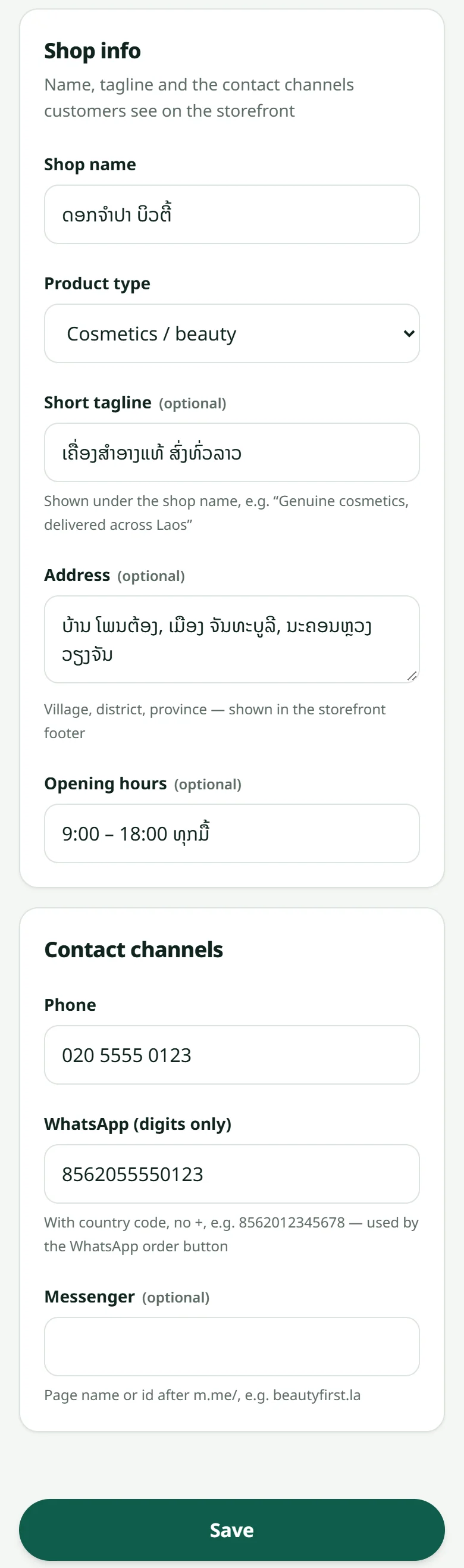
The shop's name, tagline, kind, address, opening hours and WhatsApp number that customers see — all set in “Settings” → “Info”.
Everything customers read about your shop — its name, the tagline under it, the address and opening hours at the bottom of every page, the order-on-WhatsApp button — comes from one page: “Settings” → “Info”.
- 1The shop name and a short tagline, for example “Genuine cosmetics, delivered all over Laos” — shown under the name
- 2The kind of shop: cosmetics, fashion, food, supermarket, electronics, home or other — a “Supermarket” shop gets a home page with a search box and picture categories
- 3The shop's address (village, district, province) and opening hours — shown at the bottom of the storefront
- 4A phone number, a WhatsApp number and Messenger — WhatsApp as digits with the country code and no +, for example 8562012345678
- 5Press Save — the storefront changes at once
That WhatsApp number is the shop's “Order on WhatsApp” button and the “Ask about this product” button on every product page: one tap and a message opens in your WhatsApp with the product's name and link. Put a number somebody really answers.
Shop also in English or Chinese? The name, tagline, address and hours are translated in “Settings” → “Languages” — see Your shop in English and Chinese. Logo, colours and the announcement bar live in Colours, logo and cover.
Free to build, no time limit · 7 free days of real orders once your shop is ready · No card needed
Related articles
The setup checklist
The shop's home page walks you through everything a shop needs before it opens.
Your shop in English and Chinese
Turn on English or 中文 for your customers, then translate what you wrote. Anything you leave untranslated shows in Lao.
Colours, logo and cover
Pick a palette for your shop in a few seconds.
Still stuck?
Message us on WhatsApp. Sending your shop name and a screenshot gets you an answer much faster.
Message LaoCartWant us to do it for you — enter your products, design your covers? That is an optional service, billed separately. See the optional services